
We’re pleased to announce the immediate availability of another big free update for Dorico Pro 6, Dorico Elements 6, Dorico SE 6, and (very soon) for Dorico for iPad users. Dorico 6.2 brings significant notation improvements in areas including repeats, guitar tablature and techniques, harmonics, beaming, and more. You can download Dorico 6.2 right now via Steinberg Download Assistant, but as usual we recommend you read on to find out more about all the changes in this update.
As ever, my honey-voiced colleague Anthony has prepared an overview of the changes in this release on our YouTube channel.
For full details of all the changes and improvements, download the complete Dorico 6.2 Version History PDF. Read on to dig into a couple of the highlights in this release.
Repeats
Dorico 6.2 introduces a new Repeats page in Layout Options, in which you will find new options for the display of cautionary clefs, key signatures, and time signatures at repeat barlines and repeat jumps:
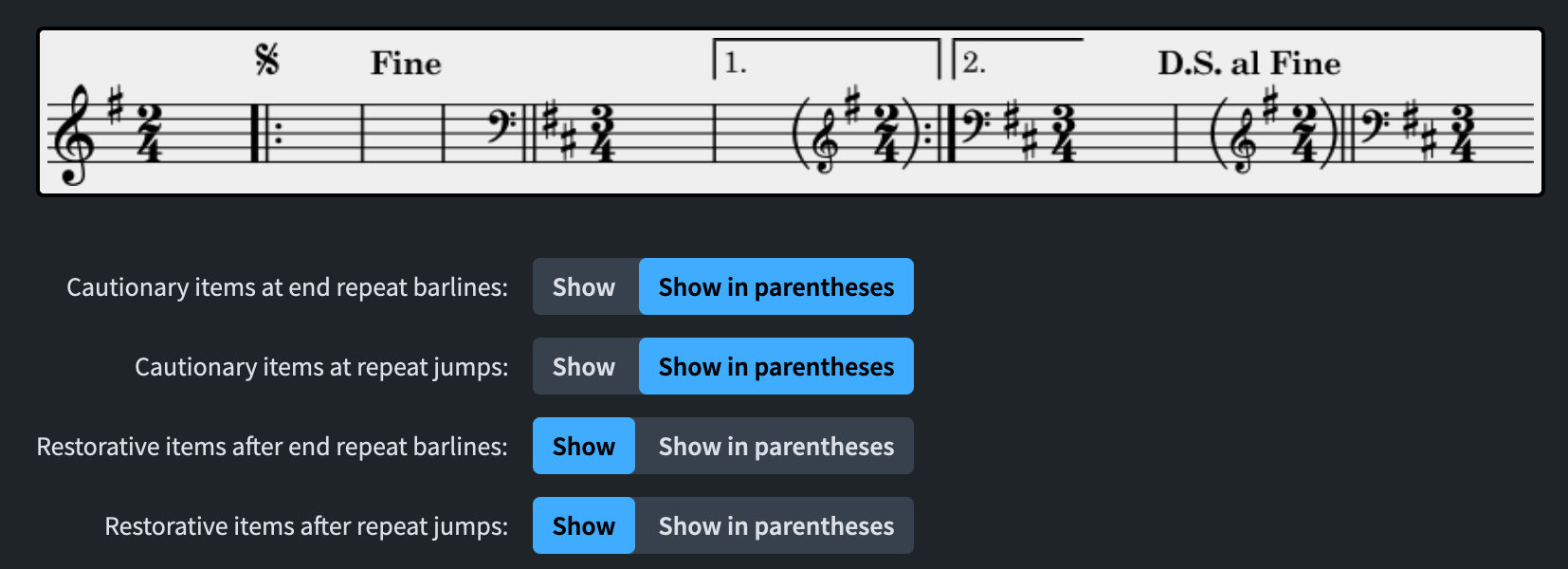
For example, if jumping back at a first ending to an earlier point in the flow, if there has been an intervening change of clef, Dorico can show the clef at the bar the repeat ending jumps back to, so that the performer has early warning of the change of clef; similarly, when jumping forward to the final ending in a repeat ending, if a cautionary clef is shown for the preceding ending, it may be necessary to show a restorative clef at the beginning of the final ending to remind the performer that the intervening clef change still takes effect.
These new cautionaries at repeats are enabled by default in new projects, but in order to maintain the appearance of existing projects, they won’t appear by default there: to enable them, you must set the new Clefs and key signatures in repeat structures option on the new Repeats page of Notation Options to Track. (Dorico warns you about this on the Repeats page of Layout Options.)
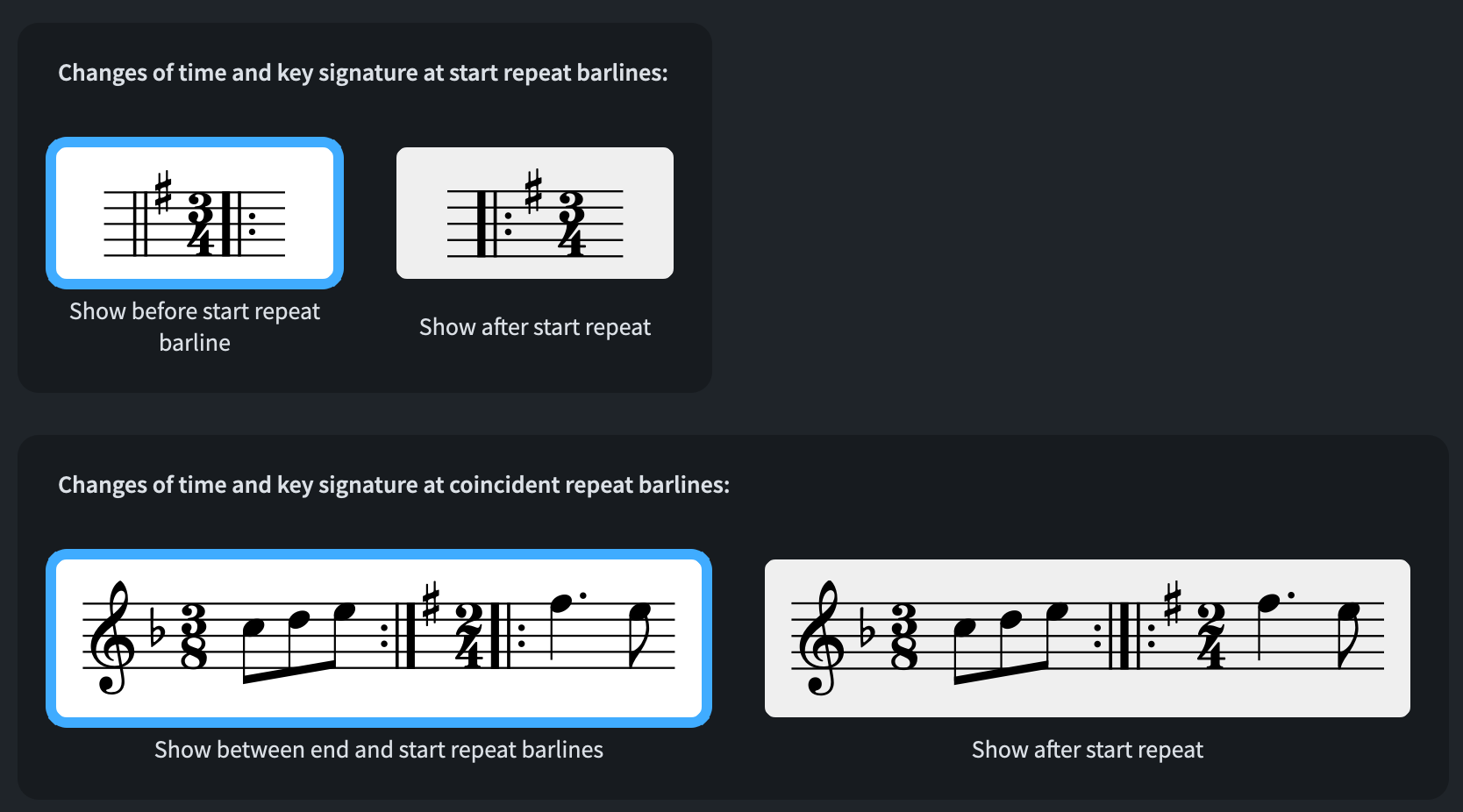
In addition, you can now choose whether changes of key and time signature that coincide with repeat barlines should be positioned to the left or right of a start repeat barline, or between the end and start repeat barlines of a combined repeat, or to the right of the start repeat barline. This has been a very long-standing request, and we are pleased to be able to introduce these options in Dorico 6.2.
There is still more work to be done to support notation across repeats more generally, in particular with items with duration that can cross repeat jumps (for example, slurs, ties, dynamics, lyrics, note-attached lines such as glissandos, and so on), and we plan to return to this area to increase Dorico’s capabilities in future versions.
Guitar tablature
There is considerable variation in the way guitar techniques such as bends, tapping, vibrato bar dips, harmonics, and so on are notated in tablature. There are perhaps two or three sets of conventions more widely used than others: from the US, the publications of Hal Leonard and Guitar World magazine represent two distinct styles; from Europe, Guitar Techniques and Guitarist magazine represent a third style. This latter style is also used in the popular Trinity/Rock School guitar syllabus, so it is becoming more widely used and understood by players.
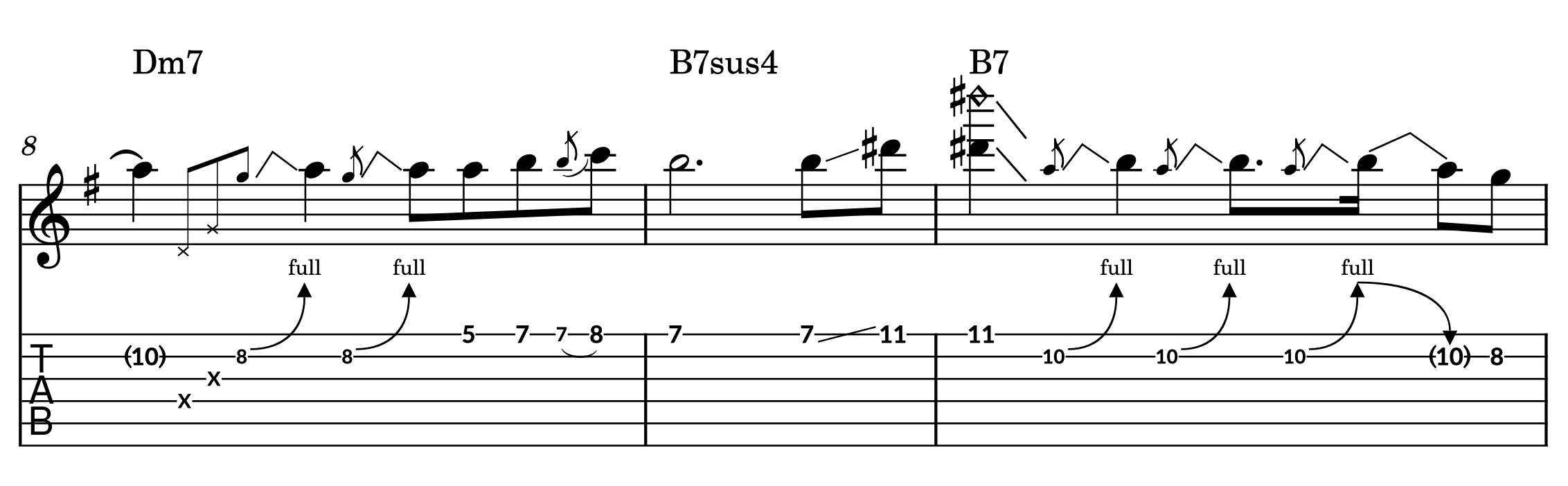
Guitar notation in the US Hal Leonard style
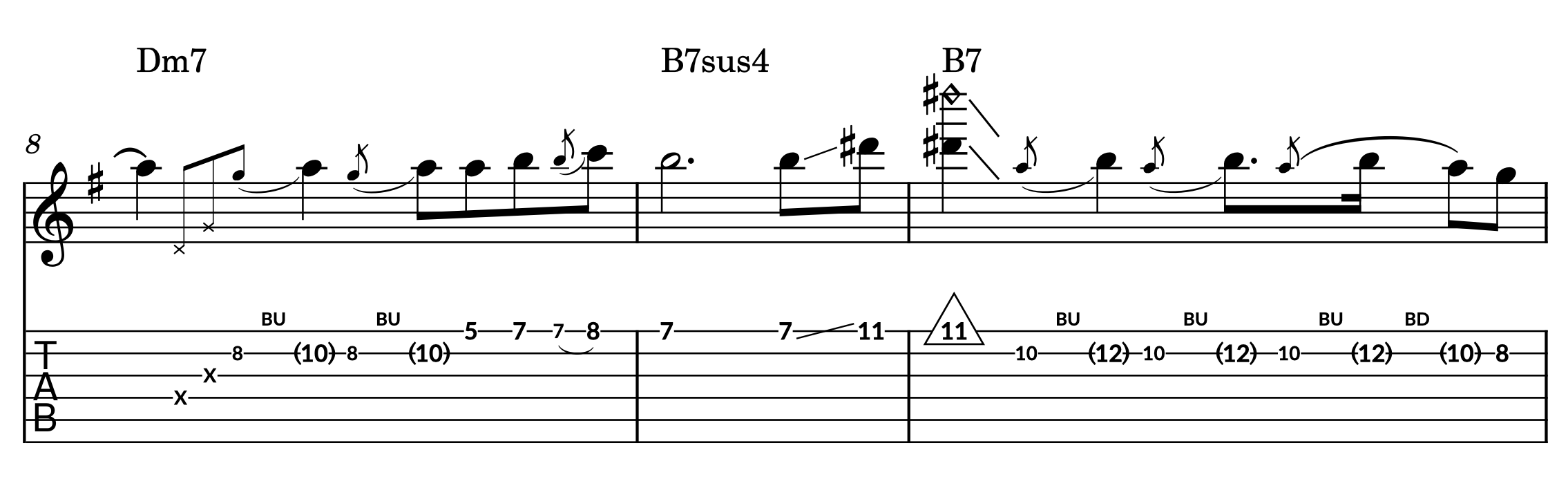
Guitar notation in the European Guitarist style
Dorico 6.2 introduces a range of features to support the European style of guitar notation, all of which are enabled in the Engraving Options dialog.
- Bends are drawn as slurs in staff notation and with BU/BD markings in tablature, with the bent-to notes shown in parentheses; this is enabled on the Bends page
- Right- and left-hand tapping is indicated with enclosures around noteheads and fret numbers; this is enabled on the Guitar Techniques page
- Vibrato bar scoops are drawn as a curved arrow with the text Scoop above them; this is also enabled on the Guitar Techniques page
- Harmonics are indicated with enclosures around fret numbers in tablature, and sequences of consecutive harmonics are indicated with NH or PH lines above the tablature, while artificial harmonics show the touched fret number above the top string; this is enabled on the Harmonics page
- Tied notes in tablature are indicated with square brackets in tablature; this is enabled on the Tablature page
Dorico 6.2 has the richest support for this European style of guitar notation of any application, and the team at Rock School will be using Dorico to publish their updated guitar exam syllabus that will be rolling out over the next couple of years.
Harmonics
Building on the new functionality for harmonics introduced in Dorico 6.1 – in which we made concrete the relationship between the Node and Partial properties for harmonics on stringed instruments, and showed the correct touched pitch for artificial harmonics based on the chosen node – we have continued to expand Dorico’s functionality for harmonics in Dorico 6.2.
New options for the notation of both natural and artificial harmonics on stringed instruments have been added, making it possible to show three pitches: the open pitch of the string on which the harmonic should be played; the touched or stopped pitch required to produce the harmonic; and the sounding pitch of the harmonic itself. Because the harmonic may be written on many ledger lines above the staff, it’s even possible to add an octave line and then set a new Artificial harmonic sounding pitches only property to write the harmonic pitch in a lower octave.
Further new options on the Harmonics page of Engraving Options allow you to choose which notehead set should be used for each different harmonic appearance. And as part of the work to support the European guitar tablature style described above, there are further improvements for harmonics in tab, including enclosures around fret numbers and indications of sequences of harmonics.
Finally, it’s now possible to create harmonics quickly using the Shift+P popover, instead of having to set multiple properties in the Properties panel. You can type simple instructions like nh or ah for natural and artificial harmonics, all the way up to things like harm nat p4 n1 style=diamond s1 (which will create a natural harmonic, partial 4, node 1, on the top string, using the diamond notehead appearance). Full details of the popover syntax can be found in the Version History.
Engraving improvements
In addition to the significant changes in the handling of repeats and guitar tablature, there are other improvements to the graphical appearance of music in Dorico, including:
- New engraving options for the default thickness of beam lines and the gaps between beams
- It’s now possible to erase the background behind fingerings outside the staff, which might be useful if you want to manually position fingerings near slurs
- Greater control over the appearance of harp pedal changes using note names, including choice of accidental design, and scale and baseline shift options for accidentals
- New properties for hiding rhythm dots and adjusting the horizontal position split stems have been added for notes and chords
- A new option for the horizontal placement of pedal line lifts has been added
- Separate engraving options for each sequence of rehearsal marks (letters, numbers, bar numbers) have been added, allowing you to specify a different enclosure type for each.
And there are other improvements to discover: check the Version History for the comprehensive list.
Workflow improvements
There are a couple of useful workflow improvements in this update, too, including a new option, found in the Editing section of the Note Input and Editing page of Preferences, to change the way selecting items with the mouse at low zoom levels works. By default, Dorico makes the click targets for all items a little larger than their actual size at low zoom levels, to make them easier to select. This includes stems – which select all noteheads on that stem – and beams – which select all noteheads on all stems within the beam. This can make it difficult to select individual notes on a stem, for example, because you will often end up clicking in the area occupied by the stem’s padding.
Depending on the kind of work you do, this might be inconvenient: so now you can set the new Prioritize noteheads option, in which stems and beams no longer have their click targets padded, meaning that it is much easier to select individual noteheads in chords at low zoom levels.
We’ve further improved the new Auto playback template first introduced in Dorico 6.1. If you have the full Etude grand piano license, Dorico will automatically use that instead of the cut-down Etude Elements included with Dorico Elements and Dorico Pro. Similarly, if you have the free Navia Harp instrument, Dorico will automatically use that in preference to the harp from Iconica Sketch. Furthermore, Dorico will prompt you to switch to the Auto playback template for existing projects that use older factory playback templates when you open them for the first time in Dorico 6.2: of course, you are free to refuse, which will ensure that your projects continue to play back exactly as they did in earlier versions.
Dorico 6.2 also includes more than 70 bug fixes to problems reported in Dorico 6.1 and earlier versions: again, refer to the Version History PDF for the complete list.
What’s next
As always, we are hard at work on future Dorico updates. You can expect at least one more small update to Dorico 6, but our attention is now largely focused on the next major version of Dorico. As always, we welcome your feedback, and we love to hear about how you’re using Dorico, and how we can make it even better for you. Please share your thoughts via our forum.
In the meantime, we hope you enjoy using all of the new capabilities provided by Dorico 6.2 and look forward to seeing and hearing all of the incredible music you will make with it.
It may be worth noting that the “Guitar notation in the US Hal Leonard style” example does not show the typical Hal Leonard style: For grace note bends the grace notes would have no stems. Also, the slide downwards from D# would also have a glissando line in the tab staff. And since there is no natural harmonic at the 11th fret you would have to specificy how to produce that harmonic (P.H., H.H.).
Y E S S S S !!!
THANK you SO much, Dorico-Team!
(Gosh!, I have been waiting for the “thicker Beams” since YEARS… and, well – used it as the excuse not to jump the Finale-Ship… ).
NOW, the new chapter WILL begin!
Thank you!
There’s gotta be an easier way to set capo chord symbols than having to figure out “C4 sounds at this note” each time. Finale simply had “capo in this key”. Dorico is a massive improvement over Finale in pretty much every other way but this workflow seems unnecessarily difficult.
Intro video was good.
bonjour, je n’arrive pas à accéder à la mise à jour 6.2 comment faire merci
音符の色を変えた時に、符頭のみ色が変わるのですが、符尾や連桁の色も変わるようにして欲しい。
“When I change the color of a note, only the notehead changes. I would like the stems and beams to change color as well.”
So where is the 6.2 update download?!?
Where can I find the update
Bonjour j’ai changé d’ordinateur. comment faire pour enregistrer le programme dans mon nouveau mcbook?
Does not affect me.
Then why bother commenting?
I just downloaded and purchased Dorico from my Make Music account as a former Finale user. When I purchased I was pretty sure the receipt said Dorico 6 but my version says 5.1.8. Can I get the latest version?
Please enable switching between single-player and session players.
When loading XML, please allow manual player assignment.
So where is the actual update?
Fantastic Update! Thank you!
Great update, but please improve Lute/Theorbo notations. French tablature for both renaissance and baroque tunings is lacking.
Bonjour,
J’utilise la version 6.1 de Dorico professionnel, la partition pour orchestre que, j’ai commencé à écrire n’accepte plus de complément ; en haut de la page il ya la mention : “lecture only”. Comment retrouver la possibilité de compléter cette partition ?
Cordialement.
Gérard SERRA.
GREAT update!! I was struggling for so much time with the repeat barline when changing the key/time signatures to appear AFTER the barline.
Also I have some ideas for what I would like to see in Dorico 7:
I would appreciate it very much if you could add in the properties panel the option to hide/show 1) barlines, 2) bar numbers, 3) clefs, 4) rests, (exactly like how you can do with time signatures for example). And I would like to be able to see all these in one place (in the properties panel), as it would be very convenient.
Thank you so much in advance.
Waiting for video export.
Please also modify the tied notes in the next update.
It’s too cumbersome to modify the notes tied to the back of the last line.
If you change the note after connecting to the string, I hope you can change it just by pressing the note.
and additonal viedo export
I’ve been using Dorico for over a year, and received your message that there is an upgrade to Dorico 6.2. But when I use the “Download Assistant” I get a erroneous message that the “download site is unavailable, check my internet connection.” My internet is working fine.
Oboist and guitarist. Notes selections in chords is a great option as I do a lot of classical style. See Prokofiev Quintet for Violin Viola Double Bass Oboe and Clarinet. See all the harmonics for the violin, as these improvements help me! … thanks! Z
OK I’m ready for the 6.2 update.
Now how do I do it?
hi I have a subscription with Dorico and. am informed that there is. a an update available yet I do not know how to download it. Can you assist?
For the life of me – I can’t figure out how to download the update. I logged onto the website and there is not one reference ot the update. Why can’t you put a link on the announcement. It just wants me to download a free trial period, Of course, I don’t want that. It says use download assistant. Where can I download the download assistant?
One thing I HATE: For example, the chord G followed by G/B (as it should be!) Is written G followers by /B! That is NOT common practice and is just plain annoying.
There is a lot of stuff on this page but no link to download the upgrade. I hav version 5.1.60 and would like to update to the current version.
But still no usable violin family fingerings?
Nel mio file Sonata in la maggiore di Mozart, dopo averla scritta tutta il programma non mi esegue le ripetizioni, perchè? Potete dirmi cosa fare per abilitare le ripetizioni (o ritornelli).
Still waiting for the Handbells Used Chart plugin.
Will I be getting updates that are corrections
This is all great news. Please add multichannel audio routing! It would be great to be able to route 16 channels to Pro Tools or Logic in real time for proper mixing of demos etc.
Want playback to emulate more ornaments and jazz techniques like do-its, etc.
I tried to upgrade to Dorico 6…and all hell broke loose”’ I now can not work….Thanks alot!
Upgrades in Finale never caused this kind of problems
Cool, Would be nice if “Playing Techniques” defaulted to piano, instead of strings because most people do sketches on piano first, then move to strings, if used.
Awesome program
Where can I download Dorico 6.2 update? Regards H. J. Steffenhagen
@Hans Jürgen: You can download it using Steinberg Download Assistant.
It doesn’t march. That’s the problem.
I have Dorico 6.1 but can’t download Dorico 6.2 because it won’t accept my saved password. I can’t find any way of changing the password. Can you help?
MAC – Still unable to download the update. Daniel was kind enough to reply and suggested I download a new version of SDA and I did, but I still get a FAIL when I try to download the update through SDA. I have the latest system software, etc. Any suggestions?
I’d love to update to the latest version, but the Steinberg Download Assistant just spins and spins – never works.
Make sure you have the latest version of the download assistant from http://www.steinberg.net/go, or alternatively download the update from our support site at https://o.steinberg.net/index.php?id=15422&L=1